

Your Bafang display determines whether you’ll love or hate your e-bike experience. Get it wrong, and you’ll deal with error codes, dead screens, and constant frustration. Get it right, and you have complete control over your ride. After analyzing hundreds of forum posts and real user problems, most display issues trace back to three factors: wrong model selection, poor installation, or mismatched compatibility. This guide covers what actually works, which models to avoid, and the installation steps that prevent 90% of common problems.
Why Your Display Choice Matters More Than You Think
Your Bafang display isn’t just a speedometer—it’s the brain that communicates with your motor controller. The wrong display can limit your motor’s performance, cause compatibility nightmares, or fail completely after a few months. Different displays use different communication protocols, and mixing incompatible units creates problems that look like motor failures but are actually communication breakdowns.
The display market is flooded with knockoffs and “compatible” units that promise Bafang compatibility but use different firmware or wiring standards. These budget alternatives often work initially but develop glitches after firmware updates or fail when you try to access advanced settings. Understanding the difference between genuine Bafang displays and third-party alternatives saves money and prevents headaches.
Reality Check: “Compatible” doesn’t mean “identical.” Third-party displays often lack firmware update support and advanced programming features, leaving you stuck with basic functionality.
Your Personal Riding Assistant: More Than Just Numbers
Bafang displays are more than just screens—they’re your e-bike’s mission control. These smart displays empower you to make informed decisions on the fly, putting essential real-time data at your disposal while maintaining complete control over your riding experience.
What Your Display Actually Does
Bafang Display Models: What Actually Works
Not all Bafang displays are created equal. Each model targets different user needs, from basic commuters to performance enthusiasts. The key is matching the display’s capabilities to your motor system and usage patterns, not just picking the cheapest or most feature-rich option.
C961: The Reliable Workhorse

The C961 dominates conversion kits because it simply works. The 2.7-inch screen provides essential data without overwhelming new users, and the three-button interface is intuitive even with gloves. Most importantly, it has the broadest controller compatibility and reliable firmware support.
Strengths:
- Works with virtually all Bafang controllers
- Long-term firmware support
- Weather-resistant design proven over years
- Replacement parts readily available
Limitations:
- No Bluetooth connectivity
- Basic black and white interface
- Limited customization options
DPC18: The Color Upgrade

The DPC18 bridges the gap between basic functionality and modern features. The 3.2-inch color screen improves readability in bright sunlight, and the interface feels more responsive than older models. However, it’s more expensive and some users report durability concerns with the color screen.
Best For:
- Riders who want modern aesthetics
- Bright sunlight visibility needs
- Users comfortable with menu navigation
860C: The Feature-Rich Option

The 860C offers the most features but demands more from users. The large screen provides extensive data, and the interface allows deep customization. However, the complexity can overwhelm casual riders, and the larger size may not fit all handlebars comfortably.
Consider if:
- You want maximum data and control
- You’re comfortable with complex menus
- You have adequate handlebar space
- You don’t mind troubleshooting occasional software quirks
EKD01: The Bluetooth Experiment
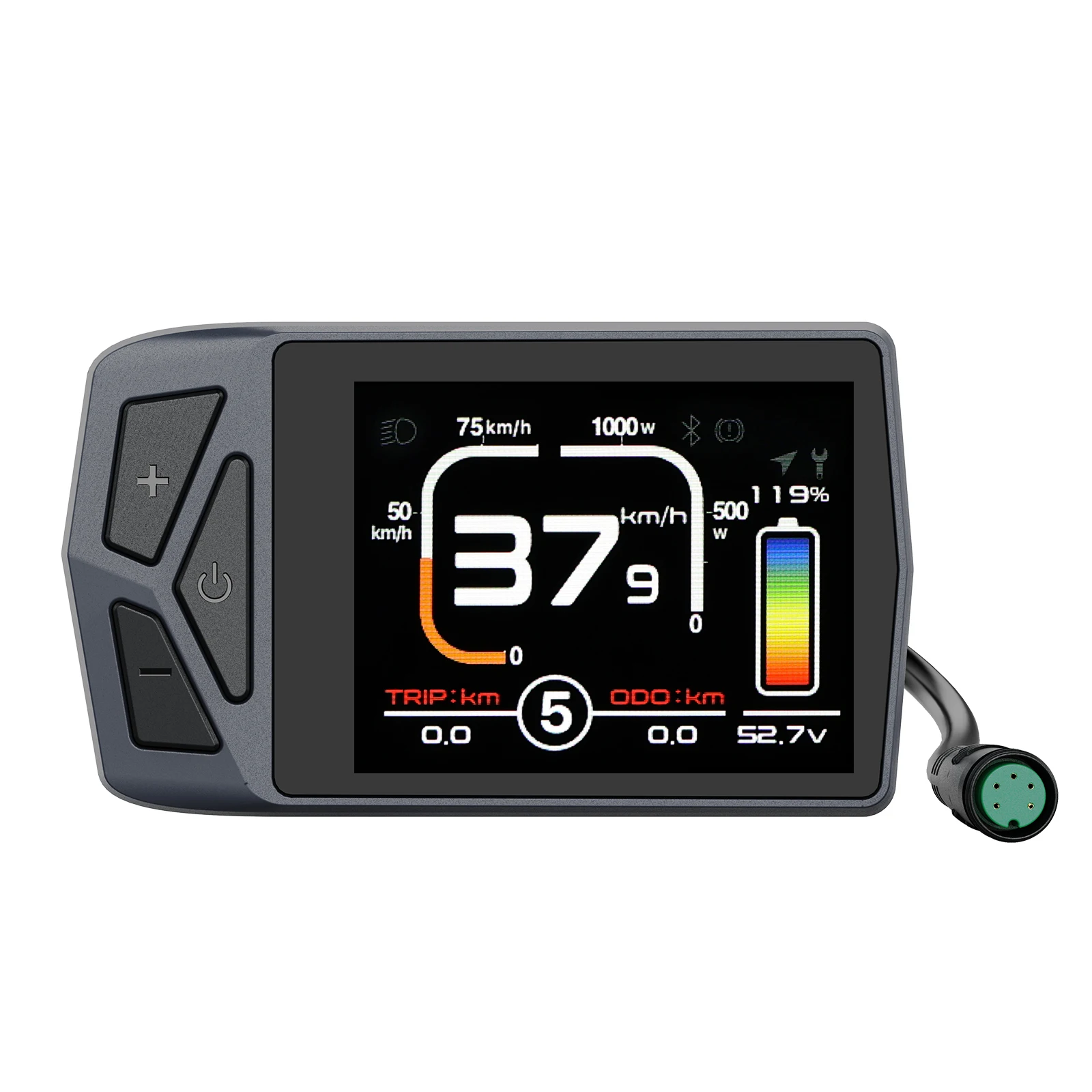
The EKD01 promises smartphone integration and GPS navigation, but real-world performance is inconsistent. App support is limited, and the Bluetooth connection drops frequently. Unless you specifically need the navigation features and accept the reliability trade-offs, stick with proven models.
Comparing Bafang Displays vs Competition
Understanding how Bafang displays stack up against other brands helps you appreciate their strengths and limitations. This comparison covers popular models from major manufacturers to give you the complete picture.

| Model | Brand | Color | Size | Bluetooth | USB Charging | Waterproof | Compatible Motors |
|---|---|---|---|---|---|---|---|
| C961 | Bafang | No | 2.7″ | No | No | IP65 | BBS01B, BBS02B, BBSHD, M-Series |
| DPC18 | Bafang | Yes | 3.2″ | No | No | IP65 | BBS01B, BBS02B, BBSHD, M-Series |
| 860C | Bafang | Yes | 3.2″ | Optional | Yes | IP65 | BBS01B, BBS02B, BBSHD, M-Series |
| VLCD5 | Tongsheng | No | 2.4″ | No | No | IP65 | TSDZ2, TSDZ2B, TSDZ8 |
| SC-E6100 | Shimano | Yes | 2.7″ | Yes | Yes | IPX5 | STEPS E6100, E7000 |
| Purion | Bosch | No | 2.1″ | No | No | IPX4 | Active Line, Performance Line |
| Nyon | Bosch | Yes | 3.2″ | Yes | Yes | IPX7 | Performance Line CX |
Key Insights: Bafang displays offer excellent value and broad compatibility but lack the premium features of Bosch/Shimano systems. The trade-off is better affordability and easier replacement when issues occur.
Display Functions That Actually Matter
Marketing materials list dozens of features, but daily riding reveals which functions you’ll actually use. Focus on displays that excel at the basics rather than those packed with gimmicky features that don’t work reliably.
Essential Functions
| Function | Why It Matters | Real-World Use |
|---|---|---|
| PAS Level Control | Adjusts motor assistance instantly | Used constantly – hills, headwinds, traffic |
| Battery Level | Prevents getting stranded | Check before every ride |
| Speed Display | Legal compliance, safety awareness | Monitor speed limits, traffic conditions |
| Trip Distance | Range planning | Useful for commuting, route planning |
| Error Codes | Diagnostic information | Troubleshooting when problems occur |
Overrated Features
Installation: Getting the Connections Right
Most display problems stem from installation mistakes, not defective hardware. The process looks simple—mount the display and plug in cables—but the details determine whether your system works reliably or constantly gives you headaches.
Physical Mounting
Electrical Connections
Bafang displays use UART communication through a 6-pin connector. The connector is keyed to prevent reverse insertion, but partial connections cause most problems. Push connectors firmly until you feel them fully seat—half-connected cables create intermittent issues that are difficult to diagnose.
| Connection Point | Failure Rate | Prevention |
|---|---|---|
| Display-Controller | Most common failure point | Dielectric grease, secure mounting |
| Control Pad | Moderate (vibration damage) | Proper mounting bracket, not over-tight |
| Internal Display | Rare (factory sealed) | Avoid impact damage |
Initial Setup: The Settings That Matter
Factory default settings work for basic operation but don’t optimize performance for your specific bike and riding style. The settings covered here address the most common user complaints and safety concerns.
Basic Configuration
Hold the “+” and “-” buttons simultaneously for 3-5 seconds. Most displays will show a settings icon or menu. If this doesn’t work, try holding the power button with either “+” or “-“.
This is the most important setting for accurate speed and distance readings. Don’t use the tire size markings—measure your actual rolling circumference with weight on the bike.
Set your preferred speed and distance units (mph/km, miles/kilometers). Some displays reset this setting after firmware updates, so double-check periodically.
| Wheel Size | Typical Circumference | Measurement Notes |
|---|---|---|
| 26″ MTB | 1950-2050mm | Varies significantly with tire pressure |
| 27.5″ (650B) | 2100-2200mm | Plus tires add 50-100mm |
| 29″ (700c MTB) | 2250-2350mm | Road vs MTB tires = 100mm difference |
| 700c Road | 2100-2150mm | High pressure reduces circumference |
Advanced Settings (Password Protected)
| Setting | Purpose | Typical Range |
|---|---|---|
| Max Speed | Legal compliance limit | 20-45 km/h (local laws) |
| PAS Levels | Assistance granularity | 3, 5, or 9 levels |
| Start Current | Motor responsiveness | 10-100% (controller dependent) |
Compatibility: Avoiding Expensive Mistakes
Not all Bafang displays work with all Bafang controllers, despite carrying the same brand name. Understanding compatibility prevents buying displays that won’t communicate with your specific motor system.
Controller Communication Types
| Motor System | Compatible Displays | Avoid |
|---|---|---|
| BBS01B/BBS02B | C961, DPC18, 860C, 500C | CAN protocol displays |
| BBSHD | All UART displays | Third-party “compatible” units |
| M400/M500 series | Depends on controller version | Older UART displays may not work |
| Latest CAN systems | Only latest CAN displays | All older UART displays |
Pre-Purchase Compatibility Check
Display Selection: Making the Right Choice
Your ideal display balances features, reliability, and budget constraints. Most riders are happiest with proven models that prioritize core functionality over flashy features that don’t work consistently.
For New Converters
- Start with the C961 – proven reliability and broad compatibility
- Skip Bluetooth models until you understand your basic needs
- Invest saved money in quality installation and proper tools
- Upgrade later once you understand which features matter to your riding style
For Experienced Riders
- DPC18 offers good feature balance without complexity overload
- 860C for maximum customization if you enjoy tweaking settings
- Avoid EKD01 unless navigation is absolutely required
- Consider third-party options like EggRider if compatibility is confirmed
Universal Advice
- Buy from suppliers with good return policies – compatibility issues are common
- Document your controller model and firmware version before ordering
- Budget for quality installation if you’re not comfortable with electrical work
- Keep original display as backup if upgrading
The best display is the one that works reliably with your specific setup and meets your actual riding needs, not marketing promises.


